Thursday, January 19, 2012

{Friday Fun} Cards, Flowers & Wall Art

Pin It

The girls on my team had fun creating this week!   Four of the girls are participating in the Rumble in the Orchard challenge. Here is their finished project:

Rumble-1-Comp

Cards that have a rainbow effect to them – each girl created a different card (and they are spread across the US and one in China!). They did great – head over and vote for them HERE (Krisi’s Kreators).

And some other projects they did:

Badges were a fun thing with the accordion flowers!

LeAnn:
accordion_leann

Tamara:
accordion_tamara

Sarah:
accordion_sarah

But they are great for cards too:

Rebecca:
accordion_rebecca

And… some wall art.

Jen:
abc_jen

Tamara – who did a girl and a boy version.
abc_tamaraabc_tamara_girl

Jennifer (who shrunk the wall art down and made it into a card):
abc_jennifer

Here are the products that they played with this week:


Are you considering going to DigiScrapApalooza? I know I am headed to Vegas in March. Come join me!  Use this code to save $20 – KRISISENTME   If you have questions… just send me an email.

Pin It

{Tutorial Thursday} Calendar It: : 2012 11x8.5 Templates

Pin It

Ready to get organized for the new year? Tackling Project 365 and looking for a way to organize all of your pictures? Then look no further than the Calendar It: 2012 Templates from Krisi's Kreations. While I used the templates originally to create a calendar to hang up for each month, I've also discovered that the template is extremely versatile and can be used for other projects throughout the year:


Project 365: I've hopped on the Project 365 +1 band wagon this year and am striving to take at least one picture a day that captures a moment, memory or snapshot of my life that I'd like to remember. I'm using the Calendar It templates to clip each of these pictures onto the calendar block for that day and at the end of the month, will have a month full of my daily snapshots to add to my album. Here's where I am so far this month!

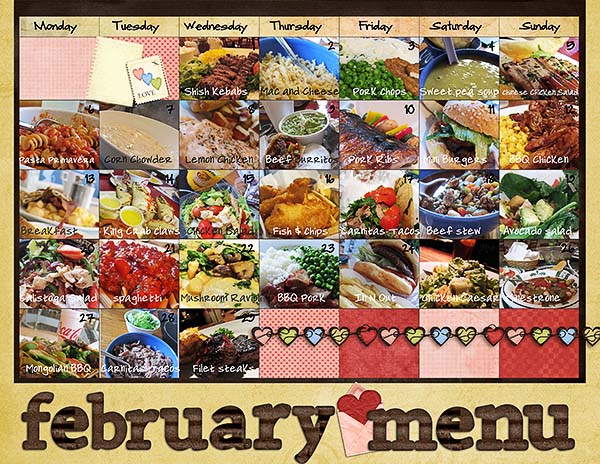
Meal Planning: I also discovered that the templates are a great way to plan out a month's worth of meals so that at any glance, I know what we're having for dinner. I added a picture of each meal for each day that it will be served to remind me of what I should shop and cook for that day. The templates made it easy to visually plan a month's worth of meals in a snap and the best thing is that if I'm ever wondering what's for dinner today, tomorrow or next week, all I have to do is find it on the page! If you didn't have the pictures for your meal, you could also include the information in a text format each day.
These are just two out of many ideas on how to use the Calendar It templates but hope that they inspire you to put your own spin the templates. You can find these templates in Krisi's Kreations store in Scrap Orchard or by clicking on the template picture above. Happy crafting!

Pin It

Wednesday, January 18, 2012

{Wacky Wednesday} Photography Tips

Pin It

During Fall soccer, I ended up volunteering to take the individual and team photos for my son's team. Needless to say, I was under pressure for them to turn out well! One thing that really catches my eye for portrait style photography is having a small depth of field. This makes the subject really stand out and keeps the background from being a distraction. This can be achieved with manual settings if you have that kind of camera, or most point and shoot cameras have a portrait setting. Luckily I was taking photos outside so I was able to open my lens aperature as big as it would go and still get correct exposure with my shutter speed. The photo below is one that I took and the grass gets blurry in the distance, which is what I wanted.


A more extreme example is this flower photo that I took on a photo walk. I really just wanted to focus on the flower and not the greenery in the background. This was a f/4.5 and 1/40th shutter speed.


There are lots of technical explanations of depth of field and I don't pretend to understand it completely, but it is worth thinking about when taking photos and it's fun to play around with and see what different looks you can get!

Pin It

Tuesday, January 17, 2012

{Project Life} Week 2

Pin It

WooHoo. I have my second week completed. Lots of pictures that I wanted to include this week and not as much journaling.

jan_wk2a_web
{linked for credits}

jan_wk2b_web
{linked for credits}

As I am working on this I am realizing little things and I am figuring out that I really want to catch some of the little things too. Something to work on this coming week when taking pictures.

Linked up to:

The Mom Creative

Pin It

{Friday Fun} & {Monday Mix}

Pin It

Ack! I forgot to post on Friday with all the fun stuff the girls created with my new goodies!  This is also a perfect Monday Mix … since this is such an easy way to add hybrid into your home!

So let me show off this fun release – and if you need to know how to customize it yourself – check out this tutorial.

Heather
messy_heather

Sharon
messy_sharon

Lori
messy_lori

Caro
messy_caro

They used this product {which is spreading all over Pinterest lately}


and for those of you who don’t have the ability to recolor I created this product so you can spend a little extra and have me customize it for you.

Wall Art: Custom JPG by Krisi's Kreations

Pin It

Thursday, January 12, 2012

{Tutorial Thursday} Wall Art Tutorial

Pin It

Hello everyone! I'm Jen, a member of Krisi's Creative Team. I'm excited to be doing a tutorial today. I don't know about you, but our house always feels so bare after Christmas. Especially because we are still adding little things here and there to our decorating, even after living in our home for three years! I love adding fun, personal touches to things, and this weeks new release is perfect for a personal decor piece! Plus, it's very fitting to all of us moms. I know I feel overwhelmed trying to clean and entertain my son, and I've had to learn to just let the cleaning go sometimes. It will be even more true once our newest son arrives next month!

Anyway, let's get going with the tutorial! If you haven't seen it yet, this week's release is this:

So cute and fun! The image is linked so you can go right to the store! And you can personalize it any way you'd like. The digital kit I chose to use for this is a newer release by Chelle's Creations called "Spic N' Span". I love the colors and the elements are darling. Here are the steps for personalizing your own wall art (I am using Photoshop Elements 9 for this).

Wall Art Tutorial

1. First, download and unzip your file.
2. Open your file in whatever program you are using.
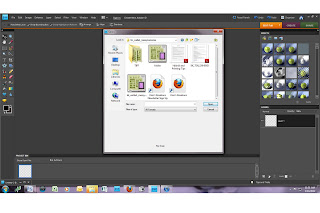

3. Next, find the kit you are going to use and begin to open the different files you think you want to use (I just drag and drop them into my program from the folder-much faster!)
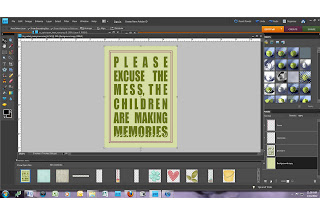
4. Now, you will want to "clip" your papers to the different layers. Making sure that your background layer is highlighted in the "Messy Memories Wall Art" window, drag the paper you want to use onto the wall art. Then, clip that paper to the background. Do the same with each subsequent layer. (In Photoshop Elements, press Control "G" to clip things to layers) Resize the papers to your liking.

The highlighted area on the right (bottom) is where I clipped the paper to the background layer.

5. Next, after clipping your papers, you can begin to personalize it by adding elements and shadows.
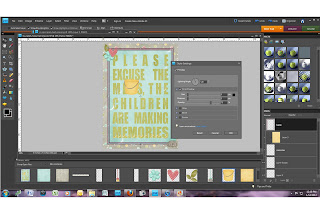


6. When you have everything looking the way you'd like, go ahead and save it (be sure to save it as your original file and then "save as" a .jpg file). Here is mine:

7. Now that you have your image, the sky is the limit as to what you do with it. You can print it professionally and have it framed, print it at home, or mod podge it like I did! I found a a 5x7 block of wood at a local wood/crafting store, a little decorative piece for the top, and some ribbon, and paint. I printed my image off at home. I love my printer and I use Premium Presentation Paper in matte (by Hewlett-Packard) to print my projects. It's beautiful and sturdy. I painted the block first and then applied wood glue to the back of my image (it just works better). Then I applied mod podge to front of the image (I use Hard Coat for projects like this because it protects it better). Finally, add some ribbon and voila! A new piece for our living room.
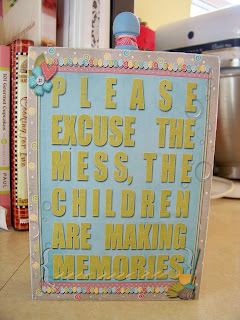
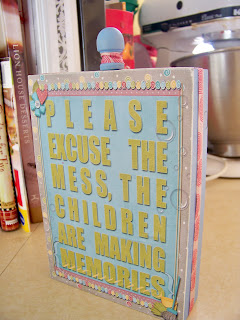
Have fun personalizing your own project! It would make a fun gift too!

Pin It

Wednesday, January 11, 2012

{Wacky Wednesday} 5 Pounds Free Document Shredding

Pin It

With it being a new year and many going through documents to get ready for taxes I thought this 5 pounds of FREE shredding would come in handy for someone!

Office Depot is offering up to 5 FREE pounds of document shredding with this coupon.  It expires on 1/28/12 so you have some time to clean out all the documents you no longer need.

Sig

Pin It